You can use the type tool to enter text into your comic strips' speech bubbles after you finished tracing and colouring. Follow the video tutorial below to input the text.


Save your Illustrator CS4 file as CS3 version
 Wednesday, August 26, 2009,
 Daniel CK Tan

Dear students,
Damai Secondary School's Labs are equiped with Adobe Illustrator CS3. If you have purchased the latest version of Adobe CS4, you will need to save the files you have created using Illustrator CS4 as CS3 version before you can work on the files in school.
Follow the steps below to do that:
1. File > Save As
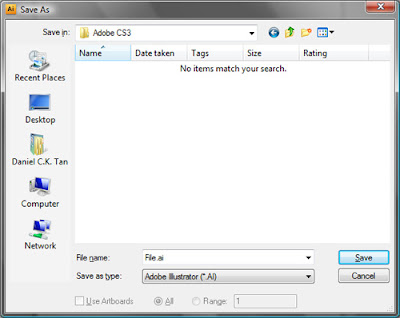
Type a file name and click Save.
2. In the next screen, change the version to Illustrator CS3
Follow the steps below to do that:
1. File > Save As

Type a file name and click Save.
2. In the next screen, change the version to Illustrator CS3

That's all! :)
File for Media Club Flash Animation
Monday, August 24, 2009,
Daniel CK Tan
Click here to download the Mascot in Illustrator format:
Cow.zip (134KB)
Search and Download Clipart for Project Work
Daniel CK Tan

Microsoft Office Portal has a number of useful resources to help you with your studies and projects. Clipart is one of the resource you can used. You can use clipart in your assignments, presentations and even your projects. Standard referencing rules applies.
To start, go to: http://office.microsoft.com/clipart
Download the Handout for the rest of the steps:
Search and Download Clipart for Project Work.pdf (1.3MB)
To start, go to: http://office.microsoft.com/clipart
Download the Handout for the rest of the steps:
Search and Download Clipart for Project Work.pdf (1.3MB)



 Useful Resources


